The Ultimate Government Social Media Strategy Guide


Government agencies aren’t new to social media, but crafting an effective government social media strategy is a different story. That’s where the real challenge begins. Tight budgets, limited connectivity, and the wildfire spread of misinformation make it harder than ever to build trust and communicate clearly.
Add public skepticism to the mix, and the stakes get even higher. But with the right approach, social platforms can become powerful tools for emergency updates, resident engagement, and meaningful feedback.
This guide will show you how to create a strategy that’s clear, purposeful, and built to serve, so your agency connects better when it matters most.
Key Takeaways:
Why a Social Media Strategy?

Social media isn’t just a public bulletin board anymore, it’s part of your day-to-day communication infrastructure.
Think about how much time your team spends chasing updates, clarifying messages, or managing miscommunication across departments.
A clear digital strategy helps you skip the chaos. It streamlines how your agency talks to itself and the public–saving time, avoiding confusion, and keeping everyone on the same page.
When your internal communication works better, your public communication does too.
Without a strategy, your presence can feel scattered. But with one in place, you set the tone.
You can respond clearly in a crisis. You build trust over time with consistent updates.
And you turn public platforms into a space where citizens feel informed and heard, not just spoken at.
When residents see consistent, accurate posts from your agency, it builds credibility.
It also opens the door for real participation. People ask questions, share feedback, and even help spread accurate information in their own networks.
Long-term, this kind of engagement leads to stronger policies, better community preparedness, and more responsive government.
So the question isn’t whether you should be online. You already are. The question is: are you using it to its full potential?
Establishing a Strong Foundation

Before you post a single update, your agency needs guardrails. A solid internal policy helps your team stay clear, compliant, and consistent–no matter who’s behind the screen.
1. Define How Social Media Is Used in Your Agency
Not all social media use is the same. Spell out the differences between:
- Official Use (agency-run accounts that represent your organization)
- Professional Use (employees engaging online in a work capacity but not as spokespeople)
- Personal Use (private accounts used outside of work, but still subject to agency guidelines if referencing the job)
Clear distinctions help reduce confusion and protect both the agency and staff.
It’s not about policing employees–it’s about giving them the right framework.
2. Cover Security and Compliance from the Start
Government agencies have to meet legal standards. That means your policy should include:
3. Put Misinformation Controls in Place
False info spreads fast, and you’ll be expected to fix it. Plan ahead by:
- Verifying content before posting
- Training staff to recognize risky replies or DMs
- Having a plan for moderating comments
- Knowing when to escalate and who responds during a crisis
4. Know Your Demographics and Their Habits
Different age groups use different platforms, and they use them differently. Here’s what current demographics show:
- Millennials (25–40) are still your core audience on most platforms. In 2025, nearly 69.2% are active daily.
- Gen Z (especially females aged 16–24) spends close to 3 hours a day on social apps—most of it on TikTok, Instagram, and YouTube.
- Older adults (50+) are growing fast on Facebook, and they often look for public notices and updates.
Your strategy should match the people you serve. You don’t need to be everywhere, but you do need to be where your residents are.
5. Speak to Communities, Not Just Individuals
People don’t interact with content in isolation. They’re part of networks–neighborhood groups, cultural communities, advocacy spaces. Messaging should:
- Be specific to local needs and voices
- “Reminder: Street repairs begin Monday on Maple Ave between 5th and 8th—expect delays from 8AM–4PM. Thanks for your patience, South Ward residents!”
- Respect the tone and values of each group
- “Wishing our Sikh community a peaceful and joyful Vaisakhi. Thank you for the contributions you make to our city every day.”
- Encourage participation, not just consumption
- “Have thoughts on the new park design? Drop your ideas in the comments or join us at the community meeting this Thursday.”
6. Be Culturally Aware and Inclusive
Cultural identity shows up online. From language and imagery to tone and timing, your posts should reflect the diversity of your community. Don’t forget:
- Use language that’s clear and respectful
- “City Hall is closed Monday for Indigenous Peoples’ Day. Regular hours resume Tuesday at 9 AM.”
- Avoid assumptions
- “All residents are welcome at the free health fair—services available regardless of insurance or immigration status.”
- Make content accessible to all, including non-native speakers and people with disabilities
- “Click the 🔗 for a Spanish-language version of this update. Alt text and closed captions included for accessibility.”
Content Creation and Management
Before you hit “post,” you need a plan that keeps your team on track and your messaging consistent.
Start with an Editorial Calendar
You don’t need a complicated setup, just a plan that works. An editorial calendar helps you map out content over weeks or months.
It’s not just for keeping track–it lets you see what’s coming, avoid gaps, and align posts with events, seasons, or internal goals.
Use it to:
- Highlight annual observances (Pride Month, Veterans Day, etc.)
- Schedule updates tied to city services or deadlines
- Build recurring themes (e.g., “Tuesday Tips” or “Throwback Thursdays”)
Whether you’re using a spreadsheet or a scheduling tool, the key is consistency.
Balance the Content Mix
Don’t turn your feed into a constant stream of announcements. A good mix builds trust and keeps people coming back.
Here’s a quick breakdown:
(a) Informational: service updates, deadlines, safety tips
(b) Promotional: local events, agency initiatives, partner orgs
(c) Emergency: clear, timely alerts when something urgent hits
(d) Engagement-driven: questions, polls, community shoutouts
(e) Human-centered: employee highlights, success stories, behind-the-scenes
Post With Purpose, Not Just Frequency
There’s no magic number, but there is a rhythm that fits your audience. Some platforms (like Twitter/X) can handle multiple posts daily. Others (like Facebook or LinkedIn) perform better with fewer, more intentional updates.
Follow these basic steps:
Set time each month to review performance and adjust as needed.
Use Language That Works for Everyone
Words matter. The way you frame content can either welcome or exclude. Keep these practices in mind:
- Skip jargon and acronyms. Use plain language
- Use people-first language (“residents with disabilities,” not “the disabled”)
- Avoid stereotypes and cultural assumptions
- Use they/them or role-based terms when gender isn’t clear (“officer,” “resident,” “team member”)
- Stay updated on language trends and community preferences
Example: Instead of saying “Our brave firemen responded to the blaze,” try “Fire crews responded quickly to contain the fire.” It’s accurate, neutral, and inclusive.
Prioritize Accessibility–From the Start
As a government agency, you’re legally responsible for making sure your digital communications, including social media, are accessible to everyone.
Under Title II of the Americans with Disabilities Act (ADA), your agency must ensure that people with disabilities have equal access to all programs, services, and communications.
That includes everything you publish online, whether it’s a public announcement, a safety update, or a city event invitation. This means more than just good intentions.
It means closed captions on videos, readable font and color contrast in graphics, descriptive alt text for images, and avoiding formats that screen readers can’t interpret.
If your post works for most people but not all, it’s not doing its job. Accessibility isn’t a “nice to have”-it’s a legal and ethical obligation.
Tools and Tips That Can Help
You don’t have to do it all manually. These platforms and tricks can make the process easier and more reliable:
| Tool | Feature | When to Use |
| CADET | Caption and description editing | When adding accurate, time-synced captions to video content |
| Rev.com | Human-generated transcripts and captions | When you need high-quality captions or transcripts fast |
| YouTube Auto-Captions | Automatic speech recognition for video | For quick captioning on YouTube—always review for accuracy |
| CamelCase | Capitalizes words in hashtags for readability | Use when writing hashtags to improve accessibility (#ThisIsExample) |
| WebAIM Contrast Checker | Tests text/background color contrast | When designing graphics to ensure readability for all users |
| NVDA | Free screen reader for Windows | To test how content will be read aloud to blind users |
| JAWS | Full-featured screen reader for Windows | When testing accessibility for advanced desktop users |
| VoiceOver | Built-in screen reader for Apple devices | To test how iOS/macOS users interact with your content |
| WAVE | Web accessibility evaluation tool | To scan posts, links, and images for accessibility gaps |
| Axe DevTools | Browser extension for automated accessibility checks | When auditing social media platforms or linked web content |
Leveraging Technology and Automation
Tech won’t replace your team, but it can definitely make your work cleaner, faster, and more reliable–especially when it comes to content and compliance.
Try AI Scheduling Tools
Your agency likely juggles multiple projects, meetings, and deadlines. AI-powered scheduling tools can help you stay organized while keeping your content consistent.
Tools like Reclaim, Motion, and Clockwise automatically find the best times to post, schedule reminders, and even help balance workloads across your team.
Other apps like SkedPal or Trevor use smart algorithms to build dynamic task lists based on your priorities, so you’re not manually slotting in time for every social update.
Here’s where they shine:
Even if you’re a small communications team, these tools can create more breathing room in your day-to-day.
Automate Common Questions and Responses
Your inbox gets flooded with repeat questions–trash pickup times, road closures, permit links.
Rather than replying manually every time, social media automation tools like Sprout Social, Agorapulse, and Sendible can handle FAQs with preset replies.
You can:
- Set up quick replies for common DMs
- Route more complex inquiries to the right department
- Monitor public sentiment with keyword tracking
- Schedule posts across multiple channels from one dashboard
Tools like Loomly and Oktopost also help maintain consistent tone and branding across posts…even if multiple team members are contributing.
Why Archiving Matters
Your posts are more than just outreach–they’re public records. Make sure you’re keeping them the right way.
Anything you publish—or receive—on official social channels can be considered a government record.
That includes posts, comments, DMs, and deleted replies. Under the Federal Records Act, your agency is required to preserve this content if it documents decisions, policies, or interactions related to government business.
Social media is interactive, fast, and informal–but the legal rules still apply.
Archiving protects your agency from compliance risks, misinformation claims, and public record requests down the line.
Best Practices for Record-Keeping
- Archive all content — including deleted posts, edited replies, comments, and direct messages, to ensure transparency with social media users and diverse audiences.
- Capture in real-time to ensure no content or interaction is missed during updates or emergencies
- Store backups in secure, searchable platforms that allow quick retrieval during audits or FOIA requests
- Include full metadata such as timestamps, usernames, platform source, and changes over time
- Label records by type (e.g., announcement, emergency alert, public comment) to simplify sorting and review
- Set retention schedules based on federal, state, or local laws–don’t guess, check your agency’s records policy
- Regularly audit your archive to confirm systems are working and updates haven’t created gaps in your data
This isn’t something you want to do manually. Luckily, there are tools built specifically for this job, such as:
- Sprout Social – Combines content management with archiving features.
- Civic Plus – Built for public sector compliance; stores all interactions in real-time.
- Page Freezer – Captures entire web and social content for legal, FOIA, and audit purposes.
Social Media Crisis Management
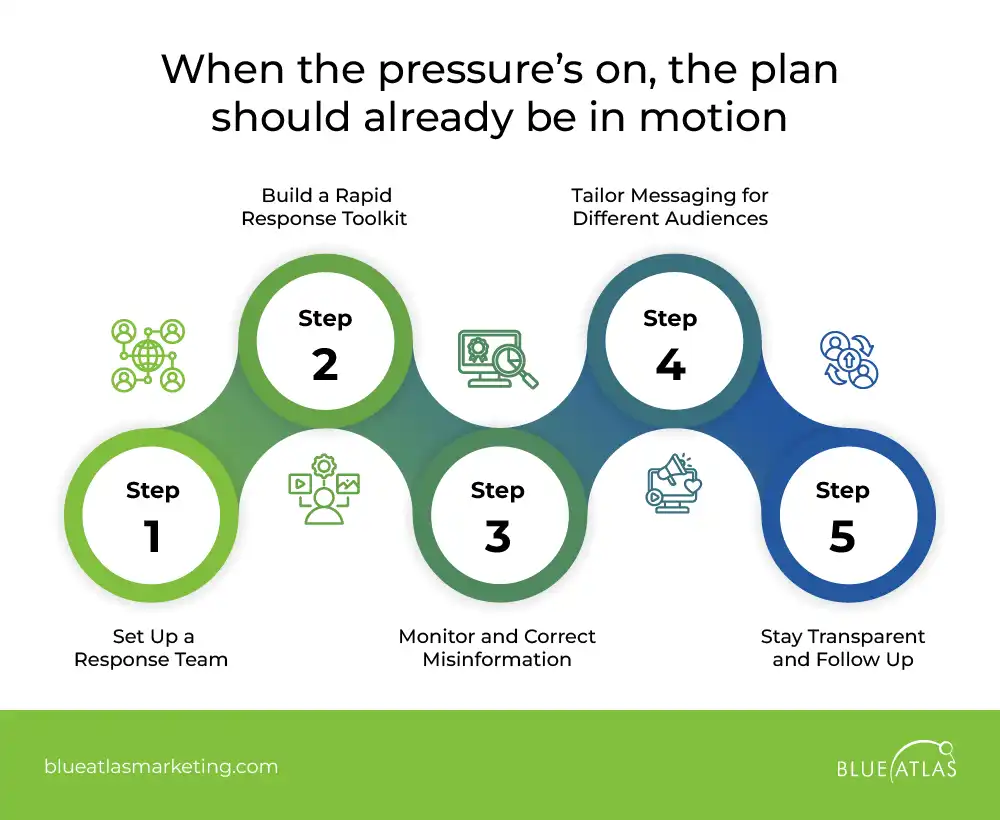
When something goes wrong, people don’t go looking for a press release—they head straight to your feed.
The faster and clearer your response, the more trust you build.
Here’s how to get your crisis communication plan in shape before things hit the fan.
Step 1: Set Up a Response Team
Don’t wait until things fall apart—know your roles in advance.
- Assign team leads for writing, approvals, posting, and public replies.
- Create a shared contact sheet across departments.
- Identify partner agencies and local organizations for signal boosting.
- Set up a group chat or Slack channel for fast coordination.
Step 2: Build a Rapid Response Toolkit
Pre-approved templates and workflows save valuable time.
- Draft holding statements (e.g., “We’re aware and investigating”).
- Save message templates for weather, outages, or delays.
- Create a short style guide for tone and language.
- Use tools you already have—don’t wait for perfect tech.
- Practice mock drills with your team.
Step 3: Monitor and Correct Misinformation
Don’t ignore false claims—they multiply fast.
- Use tools like Sprout Social, Oktopost, or Agorapulse to track keywords and mentions.
- Correct false info quickly, even if you’re not the source.
- Pin accurate updates to the top of your feed.
- Respond in plain, direct language—don’t let rumors win by being vague.
- Link to trusted sources like agency websites or public safety partners.
Step 4: Tailor Messaging for Different Audiences
One post isn’t enough—different groups get info in different ways.
- Use Instagram or TikTok for younger users; Facebook for older residents.
- Translate updates when needed, or use image-based formats.
- Share messages through community partners, SMS, or radio when digital access is limited.
- Keep language clear and jargon-free—everyone needs to understand.
Step 5: Stay Transparent and Follow Up
Even if you don’t have all the answers, say what you can.
- Let people know what you’re doing and when to expect updates.
- Acknowledge community concerns and questions.
- Share outcomes once the crisis ends—what changed, what improved.
- Show your agency is listening and adapting.
Measuring Success and Continuous Improvement
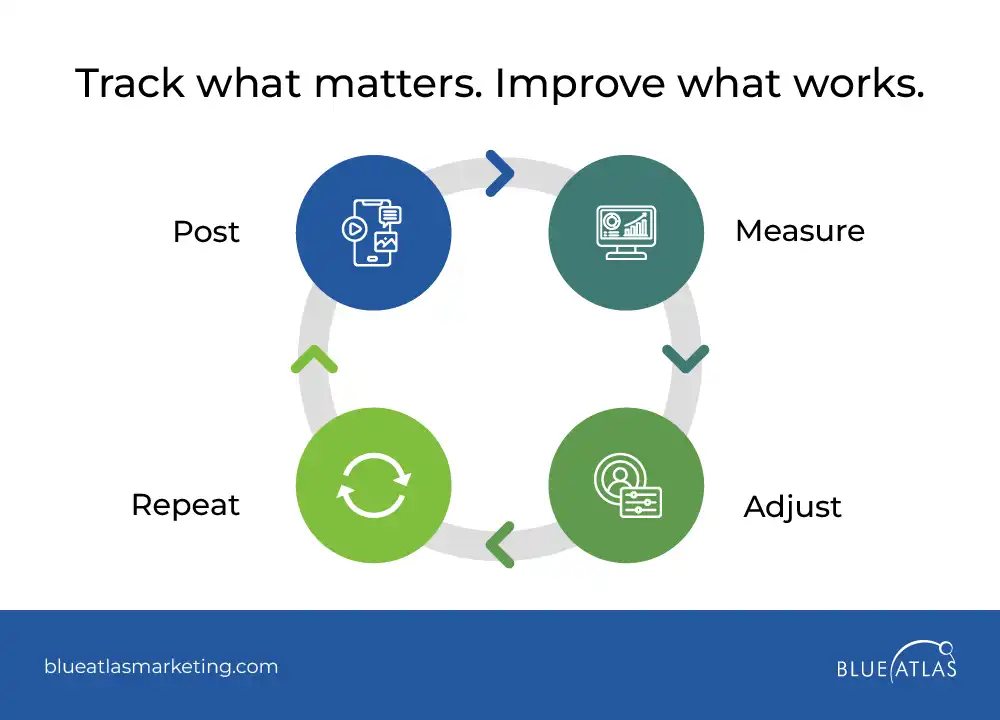
If you’re not tracking your performance, you’re just guessing.
Measuring the right metrics helps you improve what works and fix what doesn’t–without wasting time or public trust.
Key Performance Indicators (KPIs) for Government Social Media
Use KPIs that tie directly to your agency’s mission. These help track both outreach and impact.
| Category | Sample KPIs | What It Tells You |
| Arts & Culture | Event RSVPs, content shares, exhibit promotions | Community engagement with local culture |
| Building/Infrastructure | Project updates viewed, inspection reminder clicks | Public awareness of city planning and progress |
| Citizen Engagement | Poll participation, comment volume, message response rates | How engaged your residents are with your content |
| Economic Development | Job fair shares, business grant inquiries, partner mentions | Public interest in local economy efforts |
| Education | School alerts viewed, education campaign engagement | Reach within student/parent communities |
| Environment | Green initiative shares, climate event clicks | Awareness of sustainability efforts |
| Finance | Budget announcement views, tax deadline reminders shared | Clarity and transparency in financial communication |
| Housing | Affordable housing application clicks, FAQ shares | Demand and awareness of housing support services |
| Human Resources | Job post clicks, employee highlight engagement | Internal visibility and recruiting effectiveness |
| Information Technology | Outage alerts engagement, tech tip shares | Digital literacy and service awareness |
| Parks & Recreation | Program sign-ups, facility update clicks | Activity and usage within public spaces |
| Public Works | Maintenance alerts shared, service disruption interactions | Public response to city service operations |
| Public Safety | Emergency alert reach, response time tracking | Crisis communication readiness and reach |
| Transportation | Schedule updates viewed, detour alerts engagement | Efficiency of service updates and rider info |
Best Tools for Analytics and Reporting
Track engagement, reach, and sentiment across all your platforms using these analytics tools:
| Tool | Key Features | Best For | Pricing |
| Sprout Social | Engagement trends, sentiment tracking, post performance | All-in-one agency dashboards | Standard – $199 per seat/month;Professional – $299 per seat/month;Advanced – $399 per set/month;Enterprise – Custom Pricing |
| Hootsuite | Multi-channel tracking, team workflows | Collaboration across departments | Professional – $99/month;Team – $249/month;Enterprise Plan – Custom Pricing |
| Meltwater | Media monitoring, influencer tracking, advanced filtering | Public perception and external coverage | Custom Pricing |
| Zoho Social | Real-time tracking, custom reports | Smaller teams or limited budgets | Free – $0/month;Standard – 10$/month:Professional – $30/monthPremium – $40/month -Billed Annually- |
| Sprinklr | AI insights, government-grade compliance tools | Enterprise-level strategy | Custom Pricing |
| SOCi | Localized performance data, review response | Multi-location or regional governments | Request Quote and Get Demo |
| Semrush Social | Competitive benchmarks, content optimization suggestions | Understanding reach vs. similar agencies | Pro – $139.5/month:Guru – $249.95/month;Business – $499.95/month |
Regular Policy and Strategy Updates
Your strategy isn’t “set it and forget it.” Social platforms evolve, social media policies change, and your audience’s needs shift. Make space for regular reviews—quarterly or biannually works well.
Adjust your social media campaigns based on platform updates or new regulations. Use a social media tool to gather public feedback through surveys or community input sessions.
Most importantly, treat every major campaign or crisis as a learning opportunity. The goal isn’t perfection—it’s continuous improvement.
Frequently Asked Questions (FAQs)
What are the biggest challenges governments face in social media management?
Limited resources, misinformation, and maintaining public trust are significant challenges. Different agencies often face these hurdles, particularly when trying to balance transparency and the rapid spread of information online.
How can government agencies ensure compliance with accessibility regulations?
Follow ADA guidelines: use alt text, captions, a readable design, and accessible language. Ensuring your content is inclusive and easy to access helps government officials effectively communicate with all constituents.
What are the best social media platforms for government?
Facebook, Instagram, and X (formerly Twitter) remain key platforms. Additionally, YouTube and Nextdoor offer a great way to connect with constituents and increase engagement through video and neighborhood-based communication.
How often should government agencies post on social media?
Aim for 3–5 posts per week, depending on your platform and audience. Consistent posting on a regular basis helps keep constituents informed and engaged with timely updates and important messages.
How can agencies measure the success of their social media strategy?
Track KPIs such as engagement, reach, and actions like clicks or sign-ups. These metrics help agencies understand how effectively they are sharing valuable information and connecting with their audience.
A successful government social media strategy focuses on quality over quantity. For local government agencies, engaging followers requires clear, consistent communication and accessible content.
A simple way to ensure this is by continuously tracking engagement, adjusting your approach, and keeping official social media accounts updated with relevant, accurate information. By doing so, you can better serve your community and build trust with your audience.
Why Choose Blue Atlas Marketing?
At Blue Atlas, our district city marketing services are built on a deep understanding of how government communication works—and what happens when it doesn’t.
Let’s build a smarter, stronger strategy together. Contact us today to get started!